SMS Opt-In & Consent Disclosure
Last updated: February 18, 2026
SMS messaging is currently unavailable.
SMS from your AI assistant is temporarily turned off across all plans. No SMS messages are sent at this time. This disclosure describes how consent works when SMS is available; it will apply again when the feature is re-enabled.
1. What Is This?
LeadClaw provides an AI marketing assistant for service-based businesses. When SMS is available, you may opt in to receive SMS messages from your dedicated AI assistant. This page explains how we collect your consent, what messages you will receive, how often, and how to stop them at any time.
2. How You Opt In (Consent Flow)
SMS consent is collected during account onboarding on our web application at https://leadclaw.io. The process is as follows:
Enter your phone number
During onboarding, you are asked to provide your mobile phone number for communication with your AI assistant.
Verify via one-time passcode (OTP)
We send a verification code to your phone via Twilio Verify. You enter the code to confirm you own the number.
Explicit consent checkbox
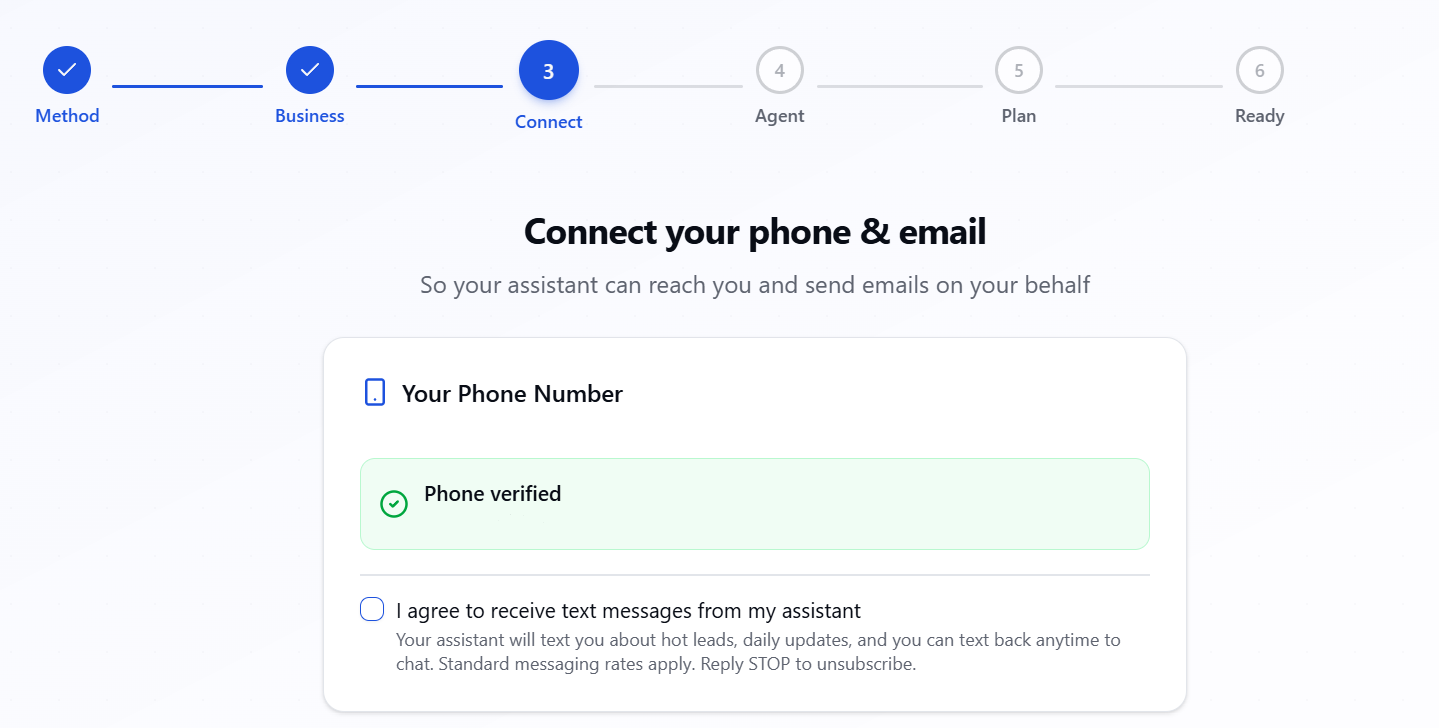
After verification, you check a consent checkbox that reads:
By verifying this number, I allow my LeadClaw AI assistant to send me SMS messages about my campaigns, leads, and business updates. Msg frequency varies. Msg & data rates may apply. Reply STOP to unsubscribe. SMS Policy
Screenshot of the opt-in form as it appears during onboarding:
Consent is recorded
Your consent is recorded in our database with a timestamp, your verified phone number, and your user ID. You can review or revoke consent at any time from your account settings.
3. Types of SMS Messages
If you opt in, you may receive the following types of SMS messages from your AI assistant:
- Assistant notifications — Updates from your AI sales assistant about campaign activity, hot lead alerts, and important events
- Weekly summaries — Brief weekly performance updates on your outreach campaigns
- Conversational replies — Responses when you text your AI assistant directly
- Account alerts — Important account or billing notifications that require immediate attention
4. Message Frequency
Message frequency varies based on your campaign activity and interactions with your AI assistant. You can typically expect 1–5 messages per day during active campaigns. You will never receive marketing or promotional SMS from LeadClaw — messages are limited to operational notifications and conversational replies.
5. Message and Data Rates
Standard message and data rates may apply depending on your mobile carrier and plan. LeadClaw does not charge any additional fees for SMS messages. Contact your mobile carrier for details about your messaging plan.
6. How to Opt Out
You can stop receiving SMS messages at any time using any of the following methods:
- Reply STOP — Text STOP to any message from LeadClaw. You will receive a confirmation message and no further SMS will be sent.
- Account settings — Log in to your LeadClaw account and disable SMS notifications from the Settings page.
- Contact support — Email support@leadclaw.io and we will remove your phone number within 24 hours.
Additional opt-out keywords: STOP, STOPALL, UNSUBSCRIBE, CANCEL, END, QUIT, OPTOUT, REVOKE.
7. How to Get Help
Reply HELP or INFO to any SMS from LeadClaw to receive instructions on how to opt out and contact information for support. You can also email us at support@leadclaw.io.
8. Data Privacy
Your phone number is used solely for communication between you and your AI assistant. We do not share, sell, or rent your phone number to third parties for marketing purposes. SMS messages are sent via Twilio, our trusted messaging provider. For full details on how we handle your data, see our Privacy Policy.
9. Contact Us
If you have questions about our SMS practices or need help, please contact us at: support@leadclaw.io